Siddharth Saoji
 As I have started to create more and more content for my podcasts, I have needed to do Audio editing frequently, and while there are paid and free software to do this stuff. I wanted something that could be templated and utilized minimum mental bandwidth.
Hence came this idea of using python in Google colab (for rapid anywhere access). In the post I will touch upon three functions I found repeatedly useful from the pydub library and fleep library.
- Convert audio file formats (Example below for m4a to wav)
from pydub import AudioSegment
# Load M4A file
audio = AudioSegment.from_file(“music.m4a”, “m4a”)
# Convert to WAV
audio.export(“music.wav”, format=“wav”)
2. Overlay 2 audio files (generally voice and music)
from pydub import AudioSegment
# Load the audio files
vocal = AudioSegment.from_file(“voice.wav”)
music = AudioSegment.from_file(“music.wav”)
# The louder audio should be the first parameter in overlay function
output = music.overlay(vocal)
# Save the result
output.export(“voice_with_background_music.wav”, format=‘wav’)
3. Sometimes the “.filetype” is not accurate and you need to confirm it. fleep gives you: type -> list of suitable file types, extension -> list of suitable file extensions and mime -> list of suitable file MIME types.
import fleep
with open(“music.m4a”, “rb”) as file:
info = fleep.get(file.read(128))
print(info.type)
print(info.extension)
print(info.mime)
Sample output for above — [‘video’] [‘m4v’] [‘video/mp4’]
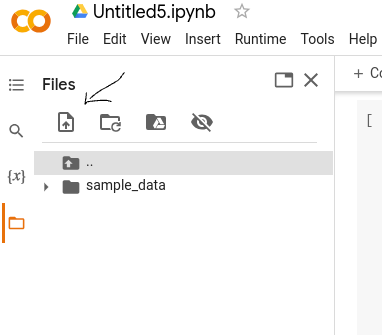
Bonus — If you have not used Google Colab for file handling before, an easy way to upload and download files on it is through the left side panel shown in the screenshot.